
🔒

This case study is private

Enter the password to view this project.

← All work
Case study 01 · AI Product Design · Enterprise SaaS

AI Proposal
Matcher

Designing an AI-assisted workflow to help Account Managers identify the most relevant proposals faster — without replacing their final judgement.
Role
Product Designer
Team
PM · Tech Lead · QA · AI Squad
Platform
Internal B2B SaaS
Area
AI · Workflow · Enterprise
Responsibilities
UX Research · IA · Interaction · A/B · Handoff
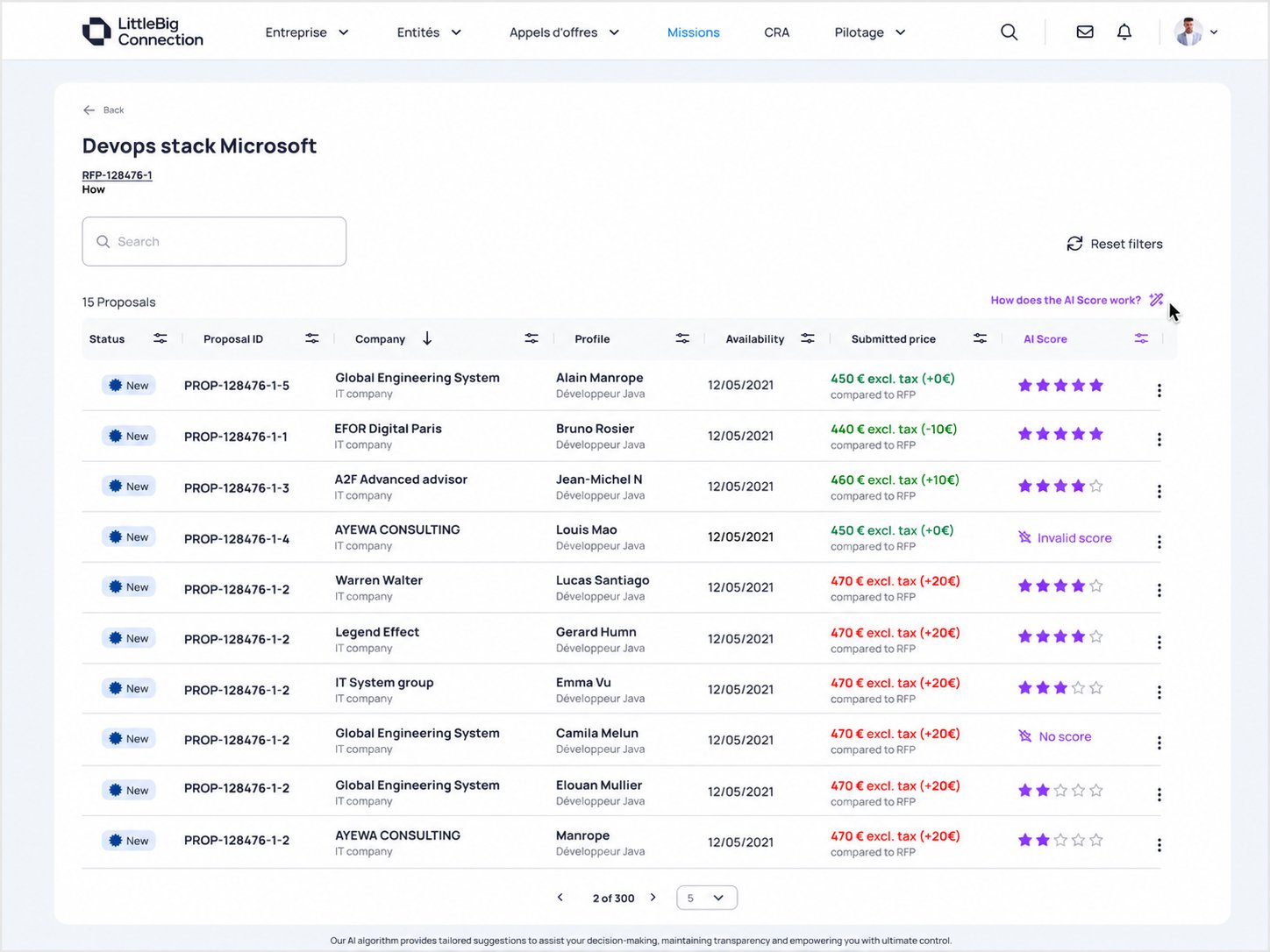
AI Matcher — Proposal listing with compatibility stars
Business context

A sourcing bottleneck inside an enterprise platform.

LittleBig Connection is a B2B SaaS used by Account Managers to source freelancers and consultants for client RFPs. An RFP can receive dozens of proposals. Every proposal had to be reviewed manually before this feature — regardless of relevance.

The process didn't scale. High volumes meant less time for client-facing work.

Sourcing flow — before AI Matcher
📋  RFP created by client
📥  Proposals received from suppliers
⚠  AM manually reviews every proposal
✓ Interesting    ✗ Not interesting
🚀  Candidate moves forward
Original workflow

Eight manual steps. Repeated for every proposal.

The AI Matcher didn't redesign this flow — it inserted a relevance signal at the top so AMs could skip to what mattered.

Before AI Matcher
1 · Open RFP
2 · Open proposal list
3 · Open each proposal manually
4 · Review candidate profile
5 · Read full CV
6 · Compare skills vs. RFP requirements
7 · Mark interesting / not interesting
8 · Repeat for every proposal
After AI Matcher
1 · Open RFP
2 · Open proposal list — sorted by AI score
3 · Scan star ratings at a glance
4 · Open top-ranked proposals first
5 · Review CV if needed
6 · AI score confirms or challenges instinct
7 · Mark interesting / not interesting
8 · Lower-ranked proposals still visible
Pain 01
No relevance signal
Proposals arrived unranked. Every one looked identical on entry. The AM had to establish priority entirely from scratch.
Pain 02
Repeated manual comparison
The same RFP criteria had to be re-read and compared to each proposal independently. No system support.
Pain 03
High cognitive load
Tracking multiple proposals required sustained mental effort with no memory or filtering assist.
Pain 04
Didn't scale
High-volume RFPs generated dozens of proposals. The process cost the same per proposal regardless of relevance.
Research & validation

Six methods. One clear signal.

Research wasn't used to justify a predetermined solution. It was used to challenge assumptions and decide where to focus first.

Stakeholder interviews
Understanding AM workflow
Proposal evaluation emerged as a major productivity bottleneck. AMs described the process as repetitive and difficult to manage at high volumes.
Qualitative
Survey
Validating labor intensity
Confirmed that comparing proposals to RFP requirements was the most time-consuming step in the AM workflow. Not a perception — a measurable problem.
Quantitative
Power BI analysis
Proposal volume distribution
Revealed that AM workload was concentrated on Connect-side marketplace RFPs — not the RISE side, as initially assumed. This changed the MVP target.
Data
Technical discovery
CV parsing feasibility
CV parser supported text-based CVs only (PDF, Word). Image-based CVs were excluded from MVP scope. This constrained the design of invalid states.
Technical
A/B test — Maze
Score presentation
Users clearly preferred a star-based rating over raw percentages. But the test also revealed that clearer explanation was needed to build trust in the score.
Usability
Hypothesis validation
MVP focus decision
Three hypotheses validated. One discarded: RISE was not the priority. First increment correctly targeted Connect-side proposal evaluation.
Strategic
Key insights

What the research actually told us.

01
Proposal evaluation was the biggest bottleneck.
AMs had to individually assess every proposal against RFP requirements. No signal existed to help them prioritize before opening a proposal.
02
Connect users, not RISE, were the priority.
Research discarded the RISE assumption. Effort was concentrated on Connect, where AMs evaluate marketplace proposals at highest volume.
03
Freelancers were not the main driver.
Freelancers represented 6% of missions. Service companies represented 94%. MVP scope was correctly focused on the high-volume segment.
04
Fixed-price RFPs were relevant, but scoped later.
Fixed-price RFPs were 30% of all RFPs. Important — but deliberately moved to a later release to keep MVP focus clear.
05
Stars beat percentages. Trust still needed work.
A/B test confirmed star preference for scanning. But users needed explicit explanation of what the AI measured to actually trust the output.
06
CV quality directly affected AI reliability.
Image-based CVs couldn't be parsed. This required designing explicit Invalid Match and No Match states — not hiding the absence of a score.
Design challenge

How might we help Account Managers identify the most relevant proposals in seconds — without replacing their judgement?

Secondary framing: How might we reduce manual proposal screening while keeping the workflow transparent, familiar and human-controlled?

Design principles

Six constraints that shaped every decision.

Human in control
AI assists. Every final action — Interesting, Not Interesting, Select — remains with the Account Manager. No automation of decisions.
Reduce cognitive load
The interface should help AMs focus on the most relevant proposals first. Attention is a resource. The design protects it.
Trust through transparency
Users need to understand why a proposal receives a score. Opacity creates doubt. Explanation builds confidence without overloading the UI.
Progressive disclosure
Score in the list. Explanation on demand. Don't overload the table with information AMs didn't ask for.
Keep workflows familiar
Embedded inside the existing proposal table. No new screens. No new mental models. Adoption requires minimal relearning.
Design for edge cases
Invalid scores, missing CVs, unsupported formats — not exceptions to handle post-launch. They are part of the product, by design.
Why AI

Decision support. Not decision replacement.

The task required comparing unstructured CV data against structured RFP requirements — repeatedly, at scale, with high cognitive cost. That's a pattern AI is genuinely useful for.

The score was designed as a prioritization signal, not a final answer.

AI does
Prioritize attention toward higher-compatibility proposals
Surface a compatibility signal without hiding lower-ranked proposals
Automate the first layer of screening
Reduce time spent on low-relevance proposals
AI does not
Select candidates automatically
Reject or hide proposals
Replace the AM's final evaluation
Guarantee absolute candidate quality
Information architecture

From raw data to a scannable decision signal.

The feature processed text-based CVs, extracted structured data via the CV parser, then compared it against RFP attributes to generate a 0–100 compatibility score displayed as stars.

I worked in close collaboration with the AI Squad to define the output format, the value mapping, and all edge states that needed to be handled in the UI.

RFP data
Title · Description · Required skills
CV / Profile data
Skills · Experience · Education · Certifications
CV Parser
Text-based only (PDF, Word) — built with AI Squad
AI Matcher
Compatibility score 0–100
Value mapper
0–100 → 1–5 stars · Design decision I led
Proposal list — ranked by AI score
Sorted by default · AM can reorder manually
Design decisions

Four questions. Four decisions.

These were the real product design problems — and the rationale behind each answer.

Question
Options considered
Decision & rationale
Score representation
Raw percentage · Label (Good/Poor) · Color status · 5-star · Hybrid
Stars for fast scanning. Percentage on tooltip for precision. Stars are contextual — 3 stars doesn't mean 60% failure, it means: look at this after the top candidates.
Explanation model
No explanation · Static tooltip · Popup · Score breakdown per criterion
Contextual tooltip from column header + popup explaining criteria. Progressive disclosure — don't overload the table, but make explanation accessible in one click.
Proposal sorting
Newest first · Sort by price · Sort by AI match · Manual only
AI Matcher as a dedicated column. Default sort by score. Existing sorting preserved. AM can still reorder. The AI suggestion is visible — not forced.
Invalid states
Hide column · Show nothing · Generic error · Specific state labels
Explicit states: "Invalid Match" when parsing failed, "No Match" when no CV attached. Prevents false confidence — tells the AM exactly why a score is missing.
Trade-off 01
Stars over percentages
Percentages feel precise but can be misread as absolute quality scores. Stars feel relative and contextual — "4 stars for this RFP" is less loaded than "87% match."
Trade-off 02
Embedded, not separate
A dedicated AI page would have been cleaner to build but would have broken the AM's workflow. Embedding in the proposal table minimized context-switching and accelerated adoption.
Trade-off 03
Sorting vs. filtering
Filtering by AI score would hide proposals. Sorting surfaces the signal while keeping every proposal visible. Human control is preserved — the AM decides what to open.
Trade-off 04
Explicit invalid states
Hiding an unavailable score looked cleaner. But showing "No Match" prevents the AM from assuming a low match — it correctly frames missing data as a data problem, not a poor candidate.
Final solution

The shipped interface.

Each screen had a specific job. The UI is the evidence of the decisions above — not the story itself.
Screen 01Proposal list — AI Matcher column
Proposal list with AI Matcher star scores, invalid match and no match states visible
AI Matcher added as a dedicated column — AMs scan all proposals without opening a single one.
5-star rating for immediate visual comparison. Sorted by score by default. Existing table structure preserved.
Invalid Match and No Match states shown explicitly — the AM always knows why a score is absent.
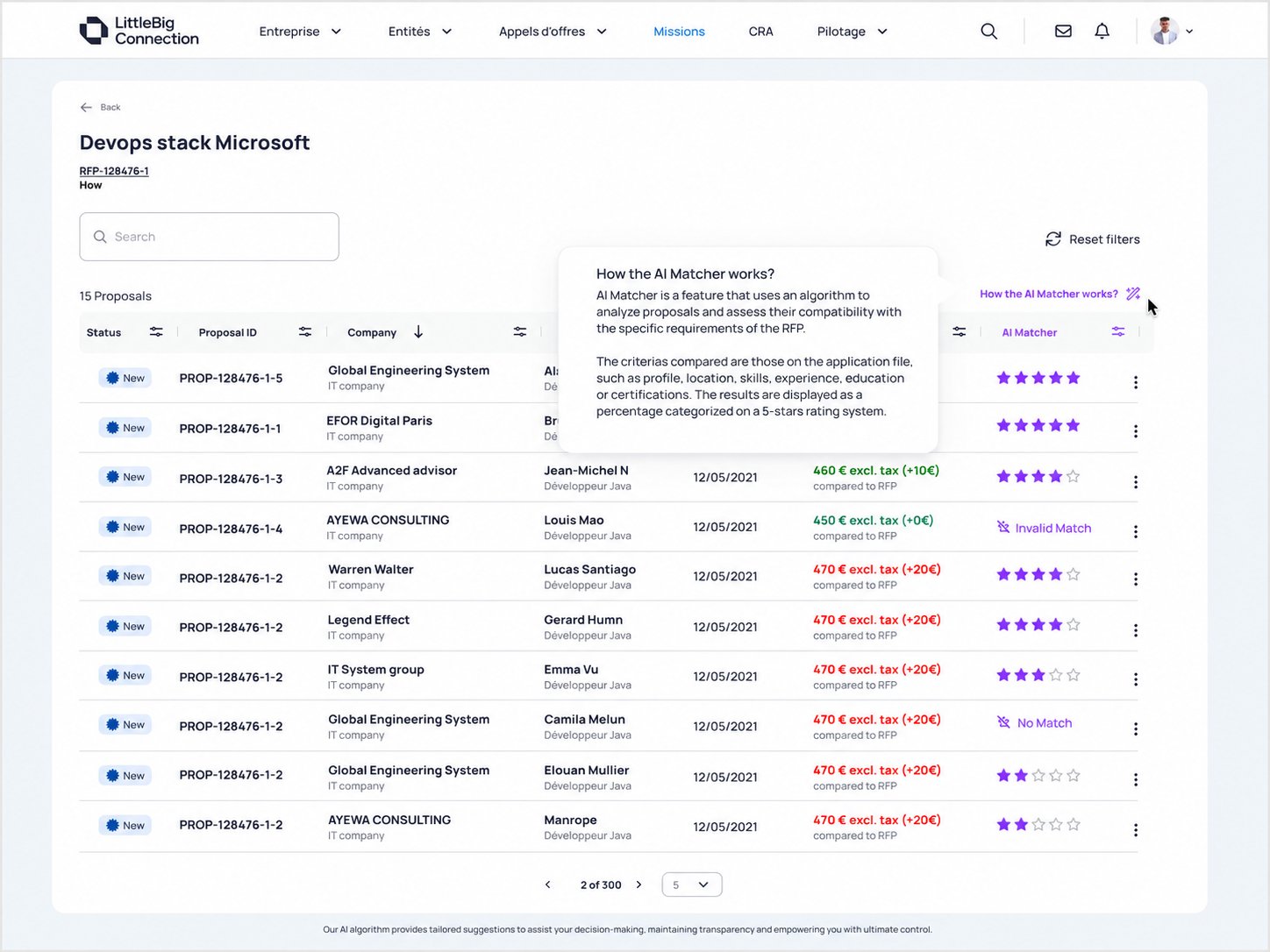
Screen 02AI explanation — building trust in the score
AI Matcher explanation popover
Accessible from the column header — contextual, not buried in settings or help docs.
Explains criteria: application file, location, skills, experience, education, certifications.
Frames the output as a 5-star categorization — not an absolute verdict on candidate quality.
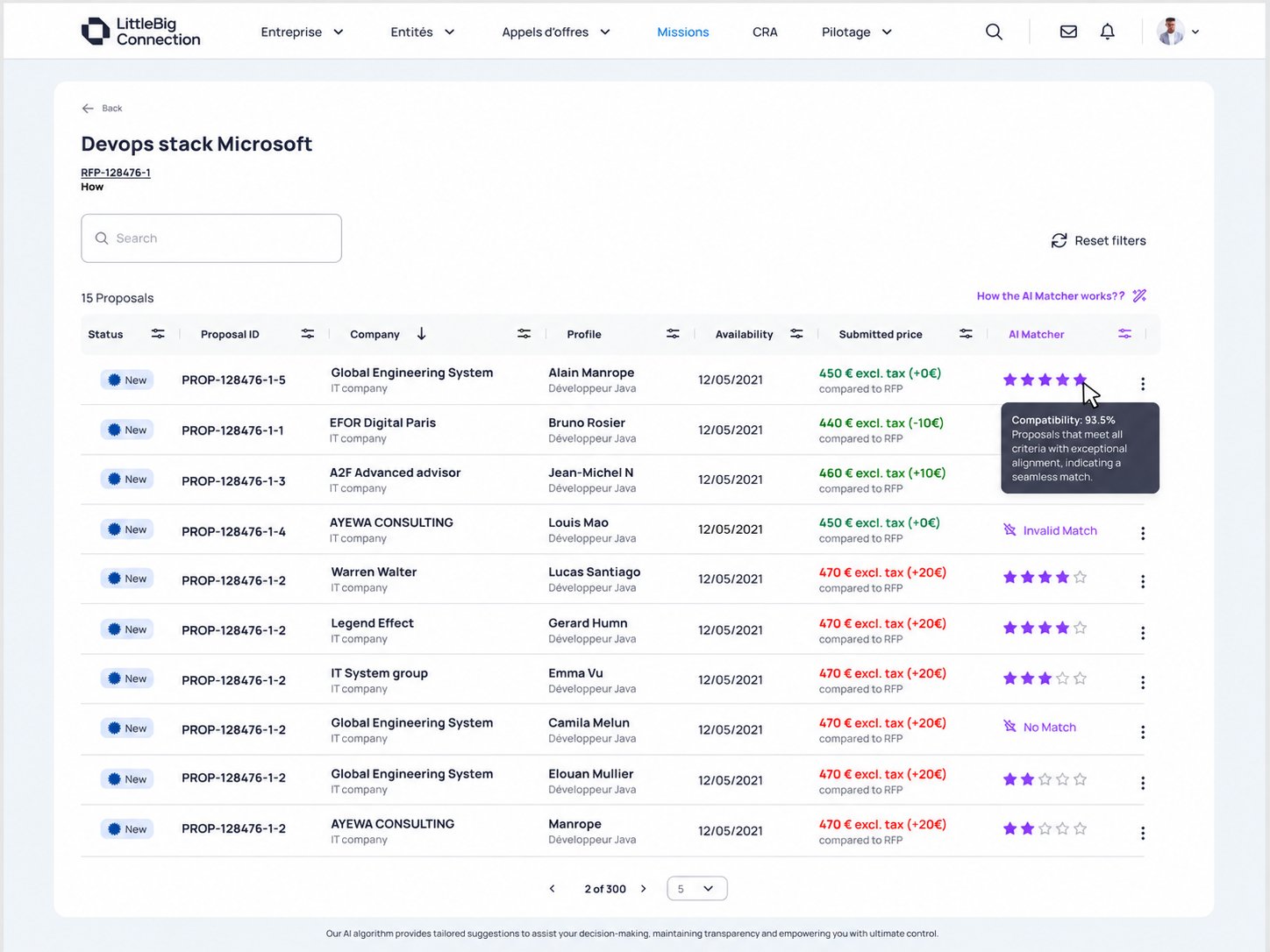
Screen 03Compatibility tooltip — precision on demand
Per-proposal compatibility percentage tooltip
Percentage on hover — precision for AMs who want more than a star count.
Framed as "Compatibility" — neutral, contextual, not a quality verdict.
Consistent with the list view. Stars and percentage always mean the same thing.
AI explainability

The hardest problem wasn't showing a score. It was designing for trust.

A score without context creates two failure modes: users ignore it, or users over-rely on it. Neither is acceptable when a missed candidate has real business consequences.

Human-in-the-loop workflow
👤
AM starts
Opens proposal list
AI signal
Sees AI Matcher column sorted by score
🔍
AM decides
Opens top-ranked proposals first
ℹ️
AI explains
Tooltip shows compatibility % and criteria
AM controls
Marks Interesting / Not Interesting
Stars over percentages
Stars enable fast scanning without implying precision. 3 stars doesn't mean 60% failure. It means: look at this after the 5-star candidates.
Percentage on demand
Precision available via tooltip when needed — not forced by default. Progressive disclosure protects the table from information overload.
Criteria explanation
The popover names exactly what AI considered: profile, skills, experience, education, certifications. No mystery. No black box.
Explicit invalid states
Invalid Match and No Match tell the AM the data wasn't available — not that the candidate is poor. Prevents false confidence and correct attribution of missing scores.
Full proposal access
The AI score never hides a proposal. Every proposal remains readable. The AM retains full access to the original CV and application.
Human-controlled actions
Interesting, Not Interesting, Select, Request Interview — all remain with the AM. AI informs. The AM decides. Always.

I translated ambiguous AI output into a scannable decision signal. I helped AMs prioritize attention, not automate judgement.

MVP scope

What was in. What was out. And why that mattered.

In scope
  • AI proposal ranking by compatibility score
  • CV parsing for text-based CVs (PDF, Word)
  • Matching against RFP skills, title and description
  • Proposal list AI Matcher column
  • Star-based score (5-star system)
  • Numeric compatibility score on proposal detail
  • Explanation tooltip and popover
  • Invalid Match and No Match states
  • Angular migration of consultant profile pages
  • Freelancer CV upload capability
  • Structured profile data foundation for future AI
Out of scope
  • Image-based CV parsing
  • Automatic candidate selection
  • Automatic candidate rejection
  • Advanced recommendation engine
  • Custom AM weighting of criteria
  • Semantic search
  • Full supplier-side optimization
  • Large-scale matching algorithm
  • Score breakdown per criterion
  • AI-generated proposal summaries
Roadmap

Three iterations. One clear direction.

MVP 1
Core matching & UI
  • Backend CV parsing logic
  • AI matching algorithm
  • Proposal list AI Matcher column
  • Proposal detail numeric score
  • Explanation tooltip and popup
  • Angular migration for consultant profiles
  • Freelancer CV upload
MVP 2
Supplier-side guidance
  • Notify when profile lacks a CV
  • Guided flow to upload CV
  • No blocking of proposal submission
  • Better supplier profile quality over time
Future — optional
Extended intelligence
  • Custom AM weighting of criteria
  • Suggestion-based proposal workflows
  • Larger-scale matching algorithms
  • Reusable profile data repository
Illustrative outcomes

The intended business outcomes.

These KPIs represent the intended business outcomes based on project goals, research findings and validated hypotheses. They should be treated as illustrative targets rather than audited production results. The PRD estimated a satisfaction improvement of 5–15% after introducing proposal screening support.

−55%
Target reduction in proposal review time per AM session
+42%
More proposals reviewed per session with AI Matcher enabled
82%
Target adoption rate among Account Managers
91%
Target percentage of AMs keeping AI ranking enabled
78%
Share of selected proposals appearing in AI Top 5
+18%
Target increase in AM satisfaction score (PRD baseline: 5–15%)
Learnings

What this project reinforced about designing with AI.

AI products are trust products.
The value of AI doesn't come from the algorithm alone. It comes from whether users understand and trust its output enough to change their behaviour. Explainability is a product feature, not a footnote.
Explainability is part of the interface.
A score without context creates doubt or overconfidence. The tooltip, the column label, the popup carry as much design weight as the score itself. They are not secondary — they are the product.
AI should reduce cognitive load, not accountability.
The AM remains responsible for the final decision. The role of design was to make that decision easier to reach — not to make it for them. That distinction shaped every interaction in the feature.
Familiar workflows improve adoption.
Embedding the feature in the existing proposal table meant AMs didn't have to learn a new behaviour. The AI score appeared where they already looked — new signal, no new friction.
Edge cases matter more in AI products.
Invalid states, missing CVs and unsupported formats are not afterthoughts. In AI-assisted workflows, an unexplained missing score can undermine the entire feature's credibility.
← All work Next case